经纬度随机生成
做地信相关的项目,经常会用到经纬度数据,没有数据的情况下只能自己造一些模拟数据,所以写了这个经纬度坐标生成的工具;找了很多这方面的资料,做了个整理,记录一下。
文中的实现思路来源于这个网站geomidpoint
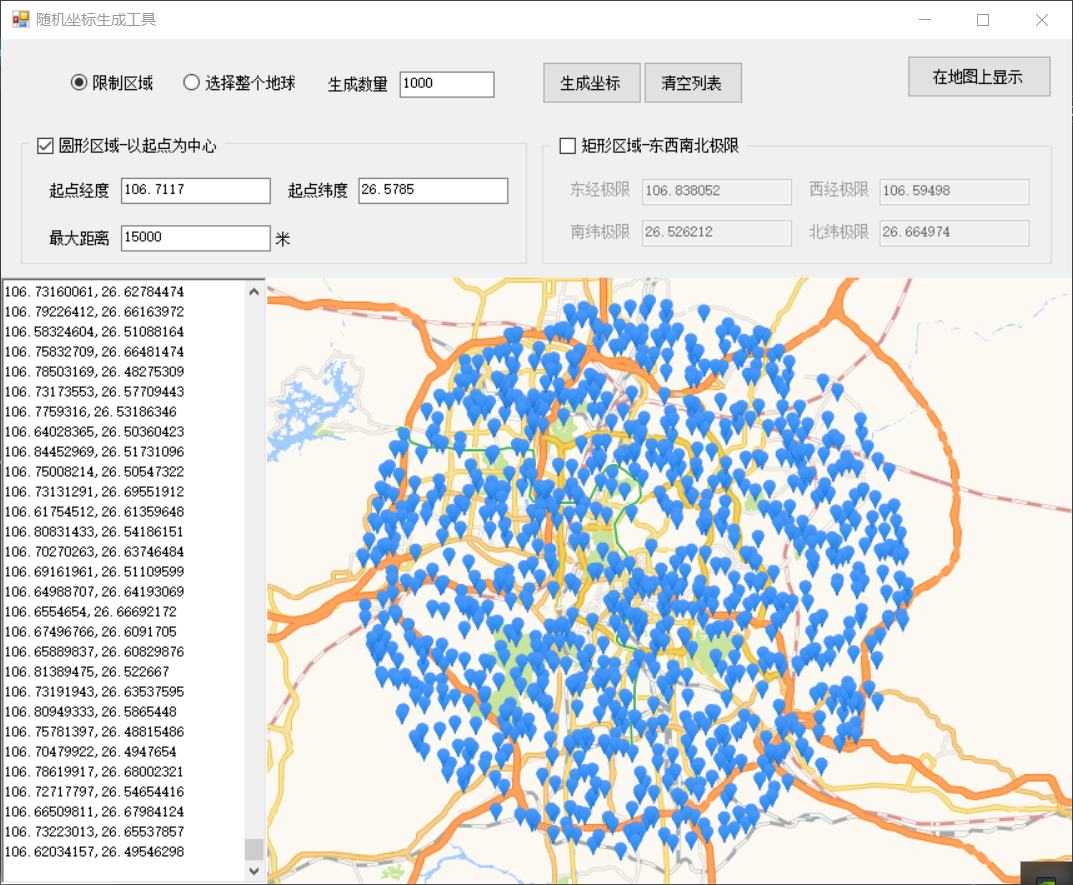
在圆形内随机生成经纬度
以起点为中心半径为x的半径为xx米的圆内生成坐标
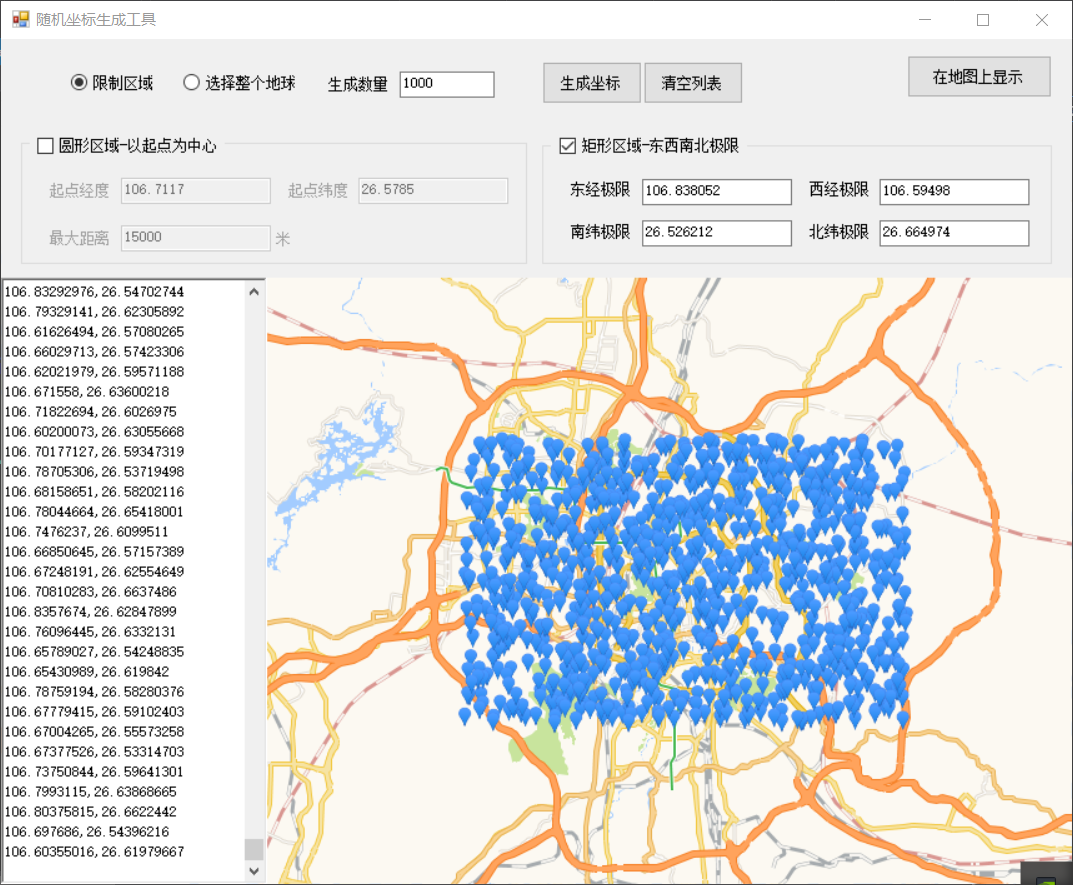
在矩形内随机生成经纬度
以东西两个经纬度的坐标极值形成的矩形内生成随机坐标
部分代码
在地图上显示按钮事件
- 这个功能使用了高德地图的API,将生成的坐标点通过访问api加载到WebBrowser页面上;但是我没有用这种方法,我是直接利用高德提供的demo页面,把示例的坐标替换为我生成的坐标,显示在WebBrowser上。
- 高德示例
private void btnShow_Click(object sender, EventArgs e)
{

    if (!string.IsNullOrEmpty(txtRes.Text))
    {
        string s = "";
        string[] ls = txtRes.Text.Trim().Split('\n');
        for (int i = 0; i < ls.Length; i++)
        {
            s += "[" + ls[i] + "],";
        }
        s = s.Trim().TrimEnd(',');
        if (chbType1.Checked)
        {
            centerpoint = txtStartLon.Text.Trim() + "," + txtStartLat.Text.Trim();
        }
        else
        {
            centerpoint = txtEast.Text.Trim() + "," + txtSouth.Text.Trim();
        }
        //替换新坐标
        string htmlUrl = Path.Combine(Application.StartupPath, "html\\marker.html");
        string text = File.ReadAllText(htmlUrl).Replace("#points_here#", s).Replace("#centerpoint#", centerpoint);
        webBrowser1.DocumentText = text;

    }
}
1
2
3
4
5
6
7
8
9
10
11
12
13
14
15
16
17
18
19
20
21
22
23
24
25
26
27
2
3
4
5
6
7
8
9
10
11
12
13
14
15
16
17
18
19
20
21
22
23
24
25
26
27
生成随机坐标按钮事件
private void btnGet_Click(object sender, EventArgs e)
{
    txtRes.Clear();

    for (int i = 0; i < Convert.ToInt32(txtCount.Text); i++)
    {
        GPSLocation gpsRes = new GPSLocation();
        if (chbType1.Checked)
        {
            //贵阳大十字广场  106.7117,26.5785
            //以贵阳大十字广场为圆心,半径8公里生成随机坐标
            GPSLocation gps = new GPSLocation()
            {
                Longitude = Convert.ToDouble(txtStartLon.Text.Trim()),
                Latitude = Convert.ToDouble(txtStartLat.Text.Trim())
            };
            gpsRes = RandomPointGenerator.GetRandomLocation(gps, Convert.ToDouble(txtMax.Text));
        }
        if (chbType2.Checked)
        {
            //gpsRes = RandomPointGenerator.GetRandomByRectangle(Convert.ToDouble(txtEast.Text.Trim()), Convert.ToDouble(txtWest.Text.Trim()), Convert.ToDouble(txtSouth.Text.Trim()), Convert.ToDouble(txtNorth.Text.Trim()));
            gpsRes = RandomPointGenerator.GetRandomLocation(Convert.ToDouble(txtEast.Text.Trim()), Convert.ToDouble(txtWest.Text.Trim()), Convert.ToDouble(txtSouth.Text.Trim()), Convert.ToDouble(txtNorth.Text.Trim()));
            //      gpsRes = RandomPointGenerator.GetRandomLocation(106.838052, 106.59498, 26.526212, 26.664974);
        }
        string point = gpsRes.Longitude.ToString() + "," + gpsRes.Latitude.ToString();
        txtRes.AppendText(point + "\n");
        txtRes.ScrollToCaret();
    }

}
1
2
3
4
5
6
7
8
9
10
11
12
13
14
15
16
17
18
19
20
21
22
23
24
25
26
27
28
29
30
2
3
4
5
6
7
8
9
10
11
12
13
14
15
16
17
18
19
20
21
22
23
24
25
26
27
28
29
30
坐标生成工具类
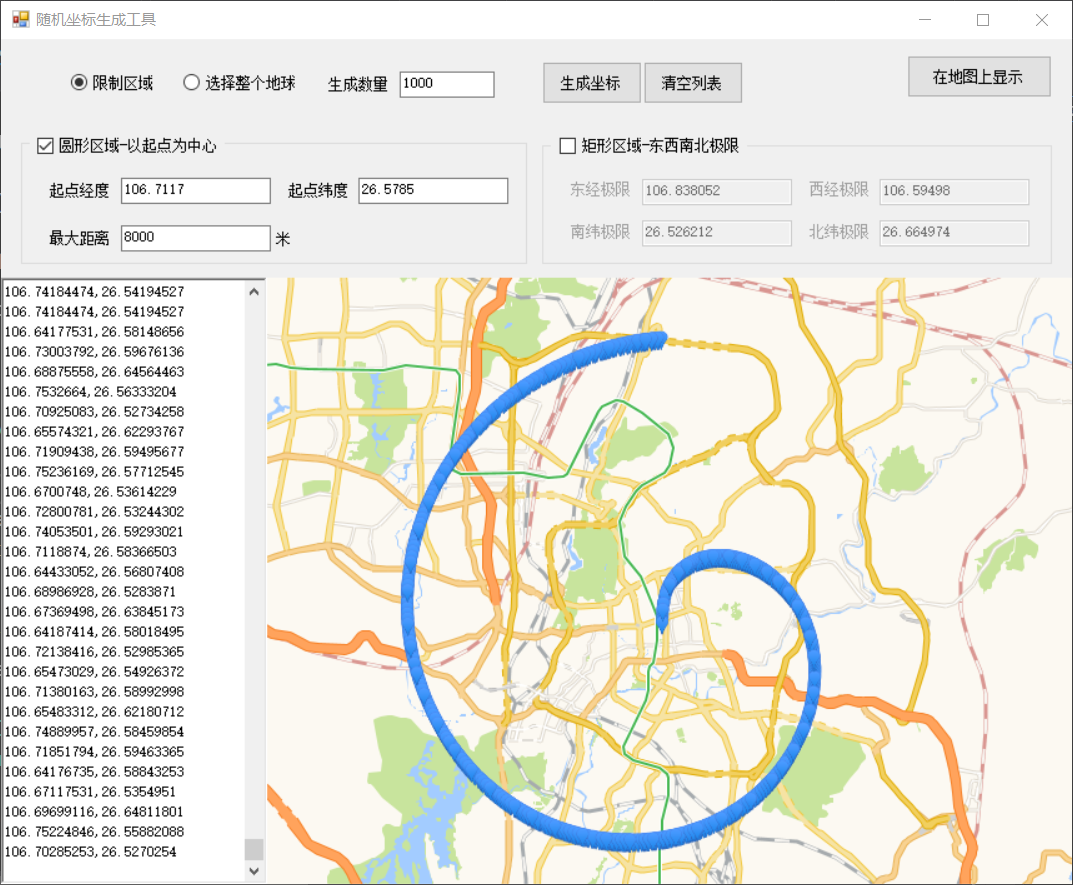
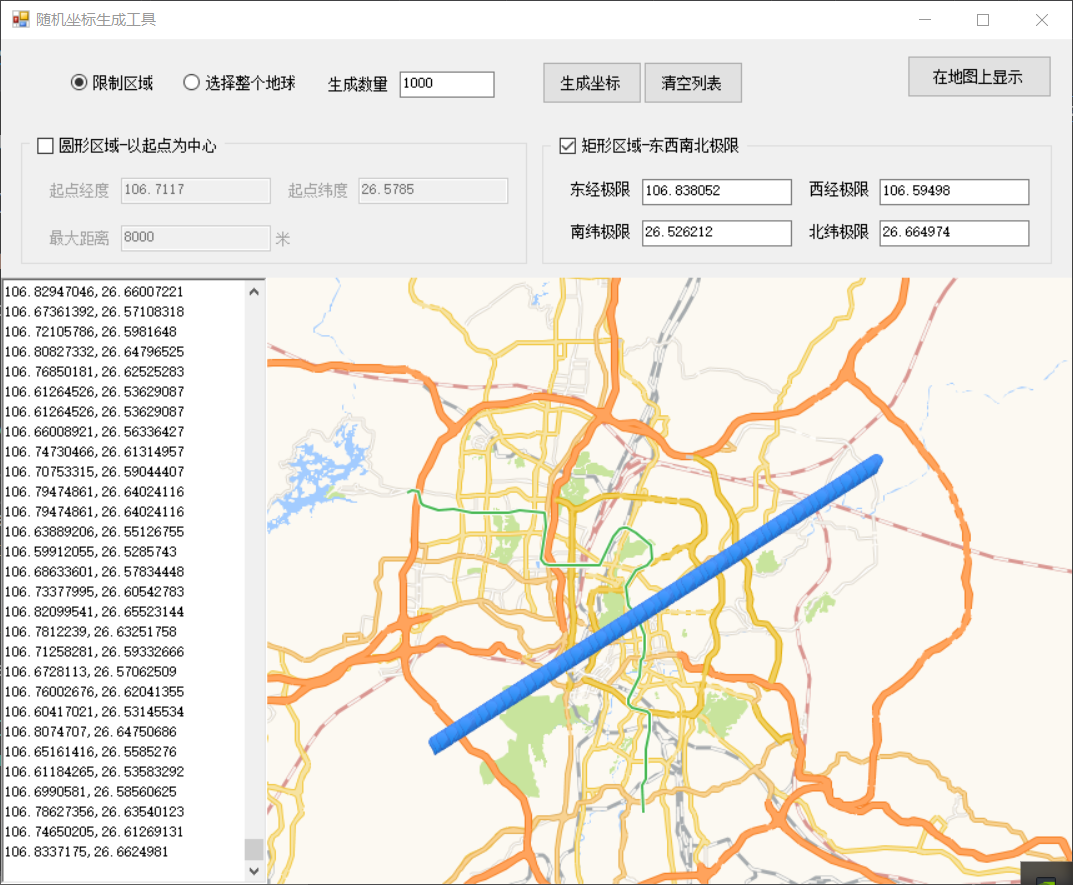
特别注意下我高亮的这行代码,也就是随机数使用种子值来初始化Random,例如Guid,这样可以保证随机数是真随机数(重复率极低)而不是伪随机数(重复概率高),不然有可能会出现下面的情况。
/*
 * 参考
 * http://www.geomidpoint.com/random/
 * https://www.cnblogs.com/jianglai11/archive/2010/07/16/1779036.html
 * https://www.twblogs.net/a/5b8ed07e2b7177188347f341/zh-cn/
 *
 * 实现方式-翻译自 http://www.geomidpoint.com/random/calculation.html
 *
 * 计算方法 - 随机点
                    本页描述了随机点生成器中使用的两种计算方法,该实用程序允许您在地球表面的任何位置生成一个或多个随机点。这实际上就像在世界地图上投掷一个或多个虚拟飞镖一样,可以选择在Google地图上查看生成的随机点。
                    因为公用事业假定地球是球体而不是平面地图,所以地球表面上的所有位置都具有相同的被选择概率。

    *A.圆形区域
                    使用此方法,您可以将生成的随机点限制为您指定的圆形区域,或者可以将其扩展为包括整个地球。您输入起点的纬度和经度以及最大距离,即以起点为中心的圆的半径。
                    为了帮助想象这个方法在选择整个地球时如何选择一个随机点,想象一下在起点周围绘制一个小圆圈,然后绘制越来越大的同心圆,直到地球中间一个圆圈与地球的圆周到达了。然后圆圈逐渐变小,直到达到从起始点到地球另一侧的点。圆的直径越大,选择该圆上的随机点的可能性越大。

            圆形区域计算细节
                   1.将所有纬度和经度转换为弧度。
                   2.rand1和rand2是在0到1.0范围内生成的唯一随机数。
                   3.鉴于初始值startlat,startlon和maxdist。(maxdist以英里或公里为单位)。
                   4.对于地球的平均半径使用:
                        radiusEarth = 3960.056052英里或radiusEarth = 6372.796924公里
                   5.将最大距离转换为弧度。
                        maxdist = maxdist / radiusEarth
                   6.计算从0到maxdist缩放的随机距离,使得较大圆上的点比较小圆上的点具有更大的选择概率,如前所述。
                        dist = acos(rand1 *(cos(maxdist) - 1)+ 1)
                   7.计算从0到2 * PI弧度(0到360度)的随机轴承,所有轴承具有相同的选择概率。
                        brg = 2 * PI * rand2
                   8.使用起点,随机距离和随机方位来计算最终随机点的坐标。
                        lat = asin(sin(startlat)* cos(dist)+ cos(startlat)* sin(dist)* cos(brg))
                        lon = startlon + atan2(sin(brg)* sin(dist)* cos(startlat), COS(DIST)-sin(startlat)*罪(LAT))
                   9.如果lon小于-PI则:
                        lon = lon + 2 * PI
                      如果lon大于PI,则:
                        lon = lon - 2 * PI
    *B.矩形区域
                    此方法允许您将生成的随机点限制为您定义的地球表面上的矩形区域,或者您可以放大矩形以包括整个地球。您可以指定矩形的北侧和南侧的纬度,以及矩形的西侧和东侧的经度。注意:这不是一个真正的矩形,因为纬度和经度线是弯曲的,经度线会聚在极点上,但它通常是在地球表面上定义区域的便捷方式,它确实提供了一种生成真正随机点的方法。球形地球。
                    该计算基于纬度线长度变化的事实,其中最长纬度是赤道,而其他纬度线根据三角函数在长度上减小,直到达到极点,两个极点具有零长度纬度线。随机经度易于计算,矩形区域中的所有经度线具有相同的被选择概率。

            矩形区域计算细节
                    1.将所有纬度和经度转换为弧度。
                    2.rand1和rand2是在0到1.0范围内生成的唯一随机数。
                    3.鉴于初始纬度北极和南极,以及经度westlimit和eastlimit。
                    4.计算随机纬度,使得矩形中较长纬度线上的点比较短纬度线上的点更可能被选择。
                        lat = asin(rand1 *(sin(northlimit) - sin(southlimit))+ sin(southlimit))
                    5.找到矩形区域的宽度。
                        width = eastlimit - westlimit
                    6.如果width小于0,则:
                        width = width + 2 * PI
                    7.计算westlimit和eastlimit之间的随机经度,所有经度具有相同的被选择概率。
                        lon = westlimit + width * rand2
                    8.如果lon小于-PI则:
                            lon = lon + 2 * PI
                       如果lon大于PI,则:
                            lon = lon - 2 * PI
 */

using System;
namespace Digihail.Tools.DataGenerator.DataGenerator
{
    /// <summary>
    /// GPS工具类
    /// </summary>
    public class RandomPointGenerator
    {
        /********随机一定要使用种子,不然生成的点有问题  new Random(Guid.NewGuid().GetHashCode()).NextDouble()********/
        const double EARTH_RADIUS = 6372.796924; // km
        const double PI = 3.1415926535898;

        /// <summary>
        /// 根据中心坐标获取指定距离的随机坐标点
        /// </summary>
        /// <param name="center">中心坐标</param>
        /// <param name="distance">离中心坐标距离(单位:米)</param>
        /// <returns>随机经纬度</returns>
        public static GPSLocation GetRandomLocation(GPSLocation center, double distance = 50)
        {
            if (distance <= 0) distance = 50;
            double lat, lon, brg;
            distance = distance / 1000;
            GPSLocation location = new GPSLocation();
            double maxdist = distance;
            maxdist = maxdist / EARTH_RADIUS;
            double startlat = rad(center.Latitude);
            double startlon = rad(center.Longitude);
            var cosdif = Math.Cos(maxdist) - 1;
            var sinstartlat = Math.Sin(startlat);
            var cosstartlat = Math.Cos(startlat);
            double dist = 0;
            var rad360 = 2 * PI;
            dist = Math.Acos((new Random(Guid.NewGuid().GetHashCode()).NextDouble() * cosdif + 1));
            brg = rad360 * new Random(Guid.NewGuid().GetHashCode()).NextDouble();
            lat = Math.Asin(sinstartlat * Math.Cos(dist) + cosstartlat * Math.Sin(dist) * Math.Cos(brg));
            lon = deg(normalizeLongitude(startlon * 1 + Math.Atan2(Math.Sin(brg) * Math.Sin(dist) * cosstartlat, Math.Cos(dist) - sinstartlat * Math.Sin(lat))));
            lat = deg(lat);
            location.Latitude = padZeroRight(lat);
            location.Longitude = padZeroRight(lon);
            return location;
        }
        /// <summary>
        /// 在指定经度和纬度绘制的矩形区域内随机生成坐标
        /// </summary>
        /// <param name="northlimit">北纬</param>
        /// <param name="southlimit">南纬</param>
        /// <param name="eastlimit">东经</param>
        /// <param name="westlimit">西经</param>
        /// <returns>随机经纬度</returns>
        public static GPSLocation GetRandomLocation(double eastlimit, double westlimit, double southlimit, double northlimit)
        {
            //106.838052,106.59498,26.526212,26.664974
            GPSLocation location = new GPSLocation();
            double lat, lon;
            //         gStartlat = (northlimit - southlimit) / 2 + 1 * southlimit;
            northlimit = rad(northlimit);
            southlimit = rad(southlimit);
            westlimit = rad(westlimit);
            eastlimit = rad(eastlimit);
            var sinsl = Math.Sin(southlimit);
            var width = eastlimit - westlimit;
            if (width < 0)
            {
                width = width + 2 * PI;
            }
            //           gStartlon = deg(normalizeLongitude(westlimit + width / 2));

            lat = deg(Math.Asin(new Random(Guid.NewGuid().GetHashCode()).NextDouble() * (Math.Sin(northlimit) - sinsl) + sinsl));
            lon = deg(normalizeLongitude(westlimit + width * new Random(Guid.NewGuid().GetHashCode()).NextDouble()));
            location.Longitude = padZeroRight(lon);
            location.Latitude = padZeroRight(lat);
            return location;
        }

        /// <summary>
        /// 获取两点间的距离(单位:米)
        /// </summary>
        /// <param name="start">起始坐标</param>
        /// <param name="end">结束坐标</param>
        /// <returns></returns>
        public static double GetDistance(GPSLocation start, GPSLocation end)
        {
            double radLat1 = rad(start.Latitude);
            double radLat2 = rad(end.Latitude);
            double a = radLat1 - radLat2;
            double b = rad(start.Longitude) - rad(end.Longitude);
            double s = 2 * Math.Asin(Math.Sqrt(Math.Pow(Math.Sin(a / 2), 2) + Math.Cos(radLat1) * Math.Cos(radLat2) * Math.Pow(Math.Sin(b / 2), 2)));
            s = s * EARTH_RADIUS;
            s = (int)(s * 10000000) / 10000;
            return s;
        }

        /// <summary>
        /// 弧度
        /// </summary>
        /// <param name="d"></param>
        /// <returns></returns>
        static double rad(double d)
        {
            return d * PI / 180.0;
        }

        /// <summary>
        /// 角度
        /// </summary>
        /// <param name="rd"></param>
        /// <returns></returns>
        static double deg(double rd)
        {
            return (rd * 180 / Math.PI);
        }

        static double normalizeLongitude(double lon)
        {
            var n = PI;
            if (lon > n)
            {
                lon = lon - 2 * n;
            }
            else if (lon < -n)
            {
                lon = lon + 2 * n;
            }
            return lon;
        }

        static double padZeroRight(double s)
        {
            double sigDigits = 8;
            s = Math.Round(s * Math.Pow(10, sigDigits)) / Math.Pow(10, sigDigits);
            return s;
        }

    }
}
1
2
3
4
5
6
7
8
9
10
11
12
13
14
15
16
17
18
19
20
21
22
23
24
25
26
27
28
29
30
31
32
33
34
35
36
37
38
39
40
41
42
43
44
45
46
47
48
49
50
51
52
53
54
55
56
57
58
59
60
61
62
63
64
65
66
67
68
69
70
71
72
73
74
75
76
77
78
79
80
81
82
83
84
85
86
87
88
89
90
91
92
93
94
95
96
97
98
99
100
101
102
103
104
105
106
107
108
109
110
111
112
113
114
115
116
117
118
119
120
121
122
123
124
125
126
127
128
129
130
131
132
133
134
135
136
137
138
139
140
141
142
143
144
145
146
147
148
149
150
151
152
153
154
155
156
157
158
159
160
161
162
163
164
165
166
167
168
169
170
171
172
173
174
175
176
177
178
179
180
181
182
183
184
185
186
187
188
189
190
191
192
193
194
2
3
4
5
6
7
8
9
10
11
12
13
14
15
16
17
18
19
20
21
22
23
24
25
26
27
28
29
30
31
32
33
34
35
36
37
38
39
40
41
42
43
44
45
46
47
48
49
50
51
52
53
54
55
56
57
58
59
60
61
62
63
64
65
66
67
68
69
70
71
72
73
74
75
76
77
78
79
80
81
82
83
84
85
86
87
88
89
90
91
92
93
94
95
96
97
98
99
100
101
102
103
104
105
106
107
108
109
110
111
112
113
114
115
116
117
118
119
120
121
122
123
124
125
126
127
128
129
130
131
132
133
134
135
136
137
138
139
140
141
142
143
144
145
146
147
148
149
150
151
152
153
154
155
156
157
158
159
160
161
162
163
164
165
166
167
168
169
170
171
172
173
174
175
176
177
178
179
180
181
182
183
184
185
186
187
188
189
190
191
192
193
194
← Test